
Инструменты пользователя
Это старая версия документа!
Содержание
Синтаксис форматирования
Шпаргалка по синтаксису. Практически все выдрано из соответствующего контекста.
DocuWiki
Cloud Plugin
This is a very simple plugin that shows a cloud of the most frequently used words in your wiki:
~~CLOUD~~
~~CLOUD:number~~
Optionally you can specify the number of words to display. Default is 50. Allowed are numbers between 1 and 999. Each of the words is linked to the search result page for it. The words are styled in a way that more frequent words are bigger and have a darker link color.
You can exclude words from the word cloud by adding them each on its own line to inc/lang/[lang-code]/stopwords.txt or to conf/stopwords.txt. Remember that last line in file should be empty to work correctly.
This plugin can also make a «tag cloud» now! (tag plugin must be installed) The syntax is also simple:
~~TAGCLOUD~~
~~TAGCLOUD:number~~
~~TAGCLOUD:number>namespace1:subns11|.|namespace2~~
It also supports clouds for the most searched words in the wiki (searchstats plugin must be installed):
~~SEARCHCLOUD~~
~~SEARCHCLOUD:number~~
Since release 2017-08-05 the number of occurrences can also be output by adding the showCount option like this:
~~CLOUD[showCount]~~
Comment Syntax Plugin
1. 'C' style comments
'C' style comments start with /* and ends with */. The comment-start markup /* must be placed at the start of line, or after a white-space letter. Comments can also span multiple lines:
/* This is a comment */
/* This is
a multi-line
comment */
The comment syntax mode has priority to list block mode. You may comment-out some list item without breaking the whole list structure.
  - item 1 /* A white space is necessary before comment-start markup */
/*- item 2    will be eliminated from this list without breaking it */
  - item 3 /* will be numbered as 2 in the list */
- item 1
- item 3
Note that 'C' style comments end at the first */ encountered. If you however wish that nested comments should be treated correctly, you can change the behavior through the configuration. In case the use_cstyle_nest option is enabled (default off), the whole part enclosed in outmost pair of /* and */ recognized as a comment:
/* There is an another comment /* in this comment */ (nested comment)*/
2. one-line comment
The «one-line» comment syntax will be available if the use_oneline_style option is enabled (default off).
* non-ordered list item // comment
- non-ordered list item
  - item 1 // A white space is necessary before One-line comment markup
//- item 2    will be eliminated from this list without breaking it
  - item 3 // will be numbered as 2 in the list
- item 1
- item 3
 Adverse effect: The one-line comment syntax
// may interfere with the markup for italics. The use of italic formatting markup //...// will be restricted so that it can not go over next line.
This text //in italics.
is rendered as normal // due to broken double-slash pairs
This text is rendered as normal
3. Control Macro like Comments
There are so-called control macros syntax, such as ~~NOCACHE~~. It may be convenient if you put a white space between ~~ and NOCACHE~~, it becomes a comment without displaying in the page.
~~ This is a comment without affecting other macros in the page. ~~
CustomButtons Plugin
Multiline Codes
If you want to have a shortcut for a common used multiline template (eg. a table) you can use «\n» in the code field to denote the line change.
Example:
Label: 3x3 Table
Code: ^ header1  ^ header2  ^ header3  ^\n|  valueA1  |  valueA2  |  valueA3  |\n|  valueB1  |  valueB2  |  valueB3  |
Discussion Plugin
Comments-section
This is the main part of the plugin. By including the ~~DISCUSSION~~ instruction in your wiki page, a discussion section will be appended after the normal wiki page content. To turn it off again, use ~~DISCUSSION:off~~. If you want to show the existing discussion but don't want to allow new comments / replies, use ~~DISCUSSION:closed~~.
~~DISCUSSION~~
~~DISCUSSION:off~~
~~DISCUSSION:closed~~
A custom title can be appended after the separator |.
~~DISCUSSION|Custom Title String~~
~~DISCUSSION:closed|Custom Title String~~
After each comment in the discussion section there may be up to three buttons (depending on your rights):
- Reply: To reply to a comment (vs. commenting on the wiki page content), click the
Replybutton. The comment entry form will then be placed accordingly. - Edit: Registered users can edit their comments; admins can edit all comments. To remove a comment, just edit it, clear the text and save the empty comment – like you would do with a wiki page.
- Delete: Registered users and admin all comments.
Attention: If there are replies to a comment, removing it will also remove all replies! - Hide / Show: Admins can deactivate and reactivate comments easily by this button. Hidden comments aren't shown to normal users and are displayed dimmed to admins. Registered users can only hide their own comments.
Of course, the whole DokuWiki syntax can be used in comments as well. But there are problems with headers and footnotes as they may produce conflicting IDs and thus invalid XHTML. I'm looking for a way to either allow only a subset of the wiki syntax or automatically create unique IDs.
Threads syntax
This displays a list of all pages of the given namespace with a discussion section. The list is sorted by the most recent comment.
{{threads>[namespace]&[count=n]&[flags]&skipempty}}
| [namespace] | the namespace for which you want a discussion thread list; : is the top namespace, . is the same namespace as the page lies in, * the whole wiki | required |
|---|---|---|
| [count=n] | the number of discussions which should be displayed (valid values: n > 0) | optional |
| [flags] | pagelist flags delimited by &, see flags | optional |
| skipempty | Do not print discussions with no comments | optional |
Default a new thread form is shown below the list. See threads_formposition setting for moving it to the top of the list, or to disable this form.
QnA Plugin
The basic QnA block starts with a question and is followed by one or more optional answers. The questions are marked by triple question mark at the start of a line, the answers — with triple exclamation mark:
??? How do I format a question?
!!! Put triple question mark at the start of a line followed by the question title.
The first line of the question (must be on the same line as the ??? marker) is used as the question title and like DokuWiki headlines does not support any formatting. The rest of the text between the title and the first answer is treated as the question details and can contain almost any DokuWiki syntax (except of headers). This also applies to the answer block — no syntax limitations.
Normally question and answer blocks span until the start of the next block or to the next section. If you want to mix QnA syntax with plain text you can explicitly terminate the block by the question block marker without the question title:
??? How do I terminate a QnA block?
What if I want to put some text after the block and that text doesn't
belong to the answer?

!!! Put triple question mark at the start of a line.
???

This text is not part of the answer.
You can organize multiple questions into sections using slightly modified headline syntax:
=?==== Level 1 headline ======
=?=== Level 2 headline =====
=?== Level 3 headline ====
=?= Level 4 headline ===
The normal headlines are still respected and may be used together with customized ones. The only difference is that they are not shown in the QnA table of contents.
The QnA TOC can be inserted with or syntax. It will be rendered as an unordered list of all questions on the current page. Note that due to implementation constrains the TOC for the current page may be not properly updated in preview during the page editing. Instead of the current page you can insert TOC for other pages by adding the page names to the syntax:
~~QNA faq:installation faq:sequrity faq:usage~~
When multiple page names are specified the plugin will combine information from all pages into a single TOC.
Stars2 Plugin
Stars can be created with two methods:
- With the Toolbarbutton Stars 1-5
- With Syntax code as shown below
{{stars>num}}
{{stars>}}
{{stars>-1/5}}
{{stars>-5/5}}
{{stars>1/5}}
{{stars>2/5}}
{{stars>3/5}}
{{stars>4/5}}
{{stars>5/5}}
{{stars>5.5/7}}
{{stars>700/1000}}
flowcharts Plugin
With the current version of the plugin it is crucial to remove the following lines from the DokuWiki file conf/entities.conf
<->     ↔
->      →
<-      ←
---     —
--      –
Otherwise, DokuWiki will render -> to → and then the diagrams are not rendered correctly since, e.g. → is the wrong syntax and we need -> etc. (For more information, see entities and also https://github.com/splitbrain/dokuwiki/blob/master/conf/entities.conf)
Alternatively, you can add the arrows in the diagram using
%%-->%%
Examples/Usage
<flow>
graph TD;
    A-->B;
    A-->C;
    B-->D;
    C-->D;
</flow>
Will be rendered to
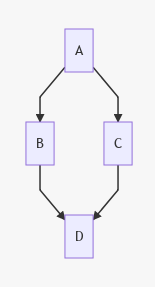
A nice feature is that each element of a diagram can be made clickable by using
<flow>
graph TD;
    A-->B;
    A-->C;
    B-->D;
    C-->D;
click A "SOMEPAGE"
</flow>
Clicking on A will take you to http://yoururl.com/SOMEPAGE.
Syntax
For further details on the syntax, see mermaidjs.github.io. Diagrams can be built in realtime using Mermaid Live Editor.